Invite a colleague
Who can do this
Owners and Admins for the whole organisation, branch managers for their branch, project leads for their project. Every plan. A plan allows a number of members.
Invite a colleague by email, with the role their work needs.
- Open People and clients, under Organisation in the Console's navigation. It opens on the People tab.
-
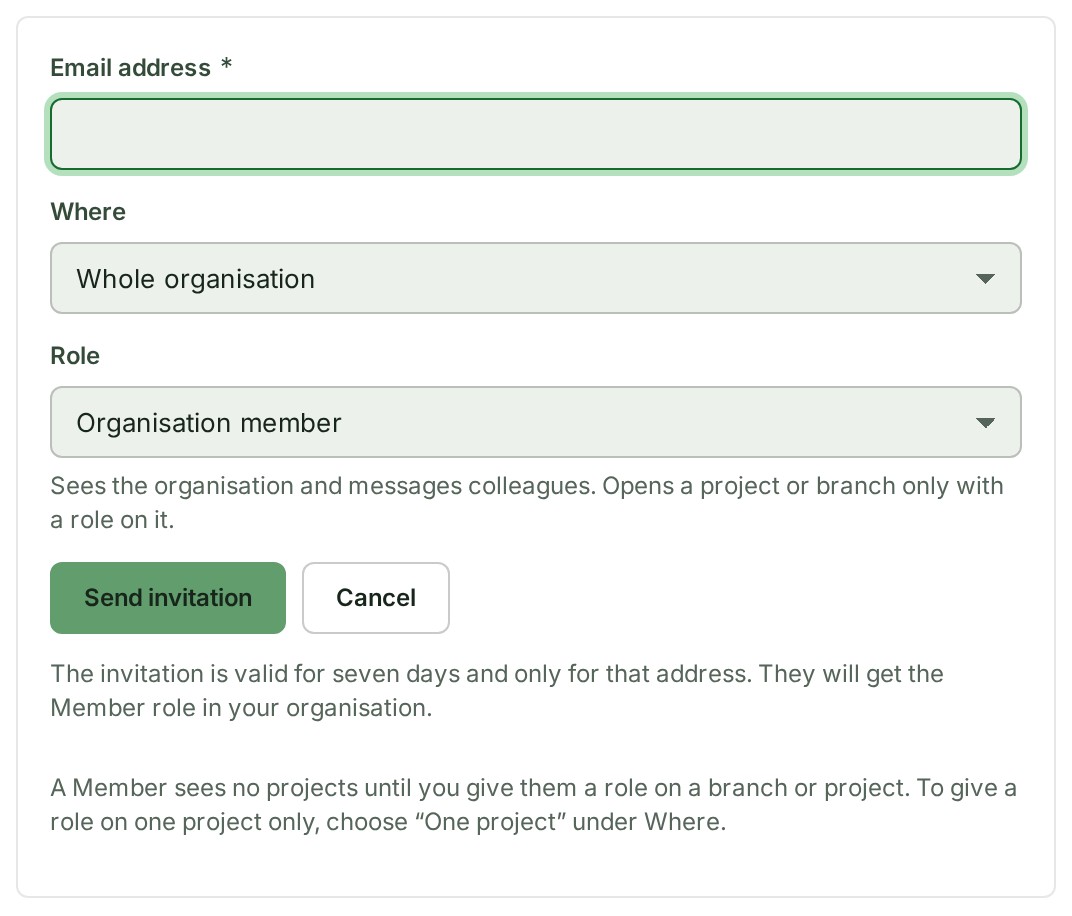
Select Invite a colleague, the main button at the top of the page. The invitation form opens.
-
Type their address in Email address. The address shows in the field.
- Under Where, choose Whole organisation, One branch or One project. For a branch or a project, a list of them appears.
- For a branch or a project, choose which one. Your choice shows in the list.
- Choose their Role. The form offers only the roles you may give.
- Select Send invitation. The invitation is sent.
What happens next
GISweaver says Invitation sent to their address, and the invitation waits under Invitations until they answer. They join from the email; the invitation is valid for seven days and only for that address.
If something goes wrong
- An invitation is already pending for that person at that scope. They have an invitation waiting already. Ask them to look for it, or resend it from Invitations.
- Confirm your email address before doing that. See Verify your email address.
- Your plan is full for … The word after for names what is full, here members. Your plan's allowance of members is used up. Whoever manages billing can change the plan.
- Invite a colleague is greyed out with Frozen — renew to save new work: the organisation's paid plan has lapsed.
Details
Which role to give
You can only give roles at or below your own, and ownership is never given in an invitation: it is handed over. Organisation member sees no projects until you add them to a branch or project; to give one project only, choose One project under Where.
Other ways to invite
The search at the top of the Console finds Invite a colleague too: type invite. Once a colleague has joined, you can also add them to a single project from that project's members panel.